Interface FormInputBuilderApi
- All Known Subinterfaces:
FormActionApi,FormInitApi
This interface provides factory methods for creating all supported input types.
It is extended by phase-specific interfaces (FormInitApi, FormActionApi)
to make input creation available in those phases.
- Since:
- 17.0 - Paloma
- See Also:
-
Method Summary
Modifier and TypeMethodDescriptioncreateAnyUserEntry(String paramName) Creates newUserEntryinput (context parameter).createBooleanUserEntry(String paramName) Creates newBooleanUserEntryBooleaninput (context parameter).createButtonEntry(String paramName) Creates a new button input.createConfigurationWizardPopup(String paramName, String typedId) Creates a new user input, the "Open" button that opens the Configuration Wizard (CW).Creates newCustomerEntryinput (context parameter).createCustomerEntry(String paramName) Creates newCustomerEntryinput (context parameter).Creates newCustomerGroupEntryinput (context parameter).createCustomerGroupEntry(String paramName) Creates newCustomerGroupEntryinput (context parameter).createCustomFormListPopup(String paramName, String typedId) Creates a new user input, the "Open" button that opens the pop-up modal.createCustomFormPopup(String paramName, String typedId) Creates a new user input, the "Open" button that opens the standalone CFO.createDashboardInputs(String paramName, String dashboardName, String... portletPath) Creates a new Dashboard Inputs input which displays all inputs of a given dashboard.createDashboardPopup(String paramName) Creates a new input which allows the user to select a Dashboard and define some associated preferences, including its input filters and displayed portlets.createDateRangeUserEntry(String paramName) Creates newDateRangeUserEntryinput (context parameter).createDateTimeUserEntry(String paramName) Creates newDateTimeUserEntryinput (context parameter).createDateUserEntry(String paramName) Creates newDateUserEntryDateinput (context parameter).createDMField(String paramName, String source) Creates a newDMFieldinput field (a context parameter).createDMFields(String paramName, String source) Creates a newDMFieldinput field (a context parameter).createDmFilter(String paramName, String fcTypedId, String field) Creates new DM dim filter input.createDmFilterBuilder(String paramName, String source) Creates a newInputType.DMFILTERBUILDERinput type.createDmFilterBuilderMultiple(String paramName, String source) Creates a newdatamartFilterBuilderUserEntriesinput (context parameter).createDmQueryBuilder(String paramName) Advanced input allowing to build one or more queries on PA and PO data sources (DMDS, DM, DMT, ...).createDmQueryBuilderDimOption(String paramName, String seriesAlias, String dimensionAlias, Map<String, Object> queryBuilderState) Creates a user input that loads only the list of dimension values from the Data Scope series, without querying all the data.createDmQueryFilterBuilder(String paramName, Map<String, Object> dmQueryBuilderState) Advanced input to use jointly with DM Query Builder.createDMSource(String paramName) Creates a newDMSourceinput (a context parameter).createFilterBuilder(String paramName, String typeCode) Creates newFilterBuilderUserEntryinput (context parameter).createHiddenEntry(String paramName) Creates new hidden input (context parameter).createInputMatrix(String paramName) Creates newInputMatrixuser input (context parameter).createIntegerUserEntry(String paramName) Creates newIntegerUserEntryIntegeruser input (context parameter).createMultiTierEntryInputBuilder(String paramName) Creates a newMultiTierInputBuilder.createOptionEntry(String paramName) Creates newOptionEntryuser input (context parameter).createOptionsEntry(String paramName) Creates newOptionsEntryinput (context parameter).createParsableInputTypeFile(String paramName) Creates a newParsableInputFileinput (a context parameter).Creates newProductEntryinput (context parameter).createProductEntry(String paramName) Creates newProductEntryuser input (context parameter).Creates newProductGroupEntryinput (context parameter).createProductGroupEntry(String paramName) Creates newProductGroupEntryuser input (context parameter).createQuoteType(String paramName) Creates a newQuoteTypeinput (a context parameter).createRadioEntry(String paramName) Creates a new radio input (context parameter).createRangeSliderEntry(String paramName) Creates new range slider input (context parameter).createRebateAgreement(String paramName) Creates a newRebateAgreementuser input (a context parameter).createResultMatrixFilterBuilder(String paramName, ResultMatrix resultMatrix) Creates a new user input that generates an advanced filter using the specified Result Matrix.Creates newSellerEntryinput (context parameter).createSellerEntry(String paramName) Creates newSellerEntryuser input (context parameter).Creates newSellerGroupEntryinput (context parameter).createSellerGroupEntry(String paramName) Creates newSellerGroupEntryinput (context parameter).createSliderEntry(String paramName) Creates a new slider input (context parameter).createStringUserEntry(String paramName) Creates newStringUserEntryuser input (context parameter).createTextUserEntry(String paramName) Creates newTextUserEntryuser input (context parameter).createTimeUserEntry(String paramName) Creates newTimeUserEntryuser input (context parameter).createTreeEntry(String paramName) Creates newTreeEntryinput (context parameter).createUserEntry(String paramName) Creates newUserEntryBigDecimaluser input (context parameter).createVLookup(String paramName) Creates newLookUpinput (context parameter).
-
Method Details
-
createUserEntry
Creates newUserEntryBigDecimaluser input (context parameter).Example:
The input field is rendered as follows:form.createUserEntry("SalesDiscountPct") .setLabel("Sales Discount (%)") .setFormatType("PERCENT") .buildFormInput()
- Parameters:
paramName- Name of the input parameter. Use a stable camelCase identifier; this is the stored input name, not the display label.- Returns:
- User entry input builder.
- Since:
- 17.0 - Paloma
- See Also:
-
createIntegerUserEntry
Creates newIntegerUserEntryIntegeruser input (context parameter).Example:
The input field is rendered as follows:form.createIntegerUserEntry("Integer") .setLabel("Enter a whole number") .setPlaceholderText("23") .buildFormInput()
- Parameters:
paramName- Name of the input parameter. Use a stable camelCase identifier; this is the stored input name, not the display label.- Returns:
- Integer user entry builder.
- Since:
- 17.0 - Paloma
- See Also:
-
createBooleanUserEntry
Creates newBooleanUserEntryBooleaninput (context parameter). Rendered as a checkbox.Example:
The input field is rendered as follows:form.createBooleanUserEntry("Boolean") .setLabel("Boolean") .buildFormInput()
- Parameters:
paramName- Name of the input parameter. Use a stable camelCase identifier; this is the stored input name, not the display label.- Returns:
- Boolean user entry builder.
- Since:
- 17.0 - Paloma
- See Also:
-
createDateUserEntry
Creates newDateUserEntryDateinput (context parameter). Rendered as a date picker field that enables the user to enter a date value.The stored value is a
String. Convert it in the consuming logic (dashboard or pricing logic), for exampleapi.parseDateWithPattern("yyyy-MM-dd", input.Date).Example:
The input field is rendered as follows:form.createDateUserEntry("Date") .setLabel("Select date") .buildFormInput()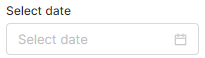
- Parameters:
paramName- Name of the input parameter. Use a stable camelCase identifier; this is the stored input name, not the display label.- Returns:
- Date user entry builder.
- Since:
- 17.0 - Paloma
- See Also:
-
createDateRangeUserEntry
Creates newDateRangeUserEntryinput (context parameter). Creates an input parameter rendered as two date picker fields that let the user enter a date range (start and end date).Note: This is available in Unity UI only.
The stored value is a two-element
Stringarray of ISO dates (start and end). Convert each bound in the consuming logic, for exampleapi.parseDateWithPattern("yyyy-MM-dd", input.DateRange[0]).Example:
The input field is rendered as follows:form.createDateRangeUserEntry("DateRange") .setLabel("Select start date and end date") .buildFormInput()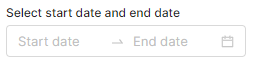
- Parameters:
paramName- Name of the input parameter. Use a stable camelCase identifier; this is the stored input name, not the display label.- Returns:
- Date range user entry builder.
- Since:
- 17.0 - Paloma
- See Also:
-
createTimeUserEntry
Creates newTimeUserEntryuser input (context parameter). Rendered as a time picker field that enables the user to enter a time value in the format "HH:mm" (for example "23:59").Example:
The input field is rendered as follows (as an example, with the time selection menu expanded):form.createTimeUserEntry("Time") .setLabel("Time") .buildFormInput()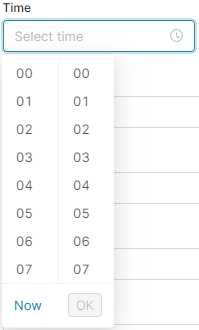
- Parameters:
paramName- Name of the input parameter. Use a stable camelCase identifier; this is the stored input name, not the display label.- Returns:
- Time user entry builder.
- Since:
- 17.0 - Paloma
- See Also:
-
createDateTimeUserEntry
Creates newDateTimeUserEntryinput (context parameter). Rendered as a datetime picker field that enables the user to enter a date time value in the format "dd/MM/yyyy HH:mm" (for example "23/01/2019 10:30").Note: The format implicitly uses the GMT/UTC time zone and so the returned value may differ from what was entered on the client side (as the client time may be in a different time zone).
The stored value is a
String. Convert it in the consuming logic, for exampleapi.parseDateWithPattern("yyyy-MM-dd'T'HH:mm:ss", input.DateTime).Example:
The input field is rendered as follows:form.createDateTimeUserEntry("DateTime") .setLabel("Select date and time") .buildFormInput()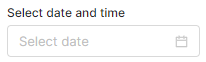
- Parameters:
paramName- Name of the input parameter. Use a stable camelCase identifier; this is the stored input name, not the display label.- Returns:
- DateTime user entry builder.
- Since:
- 17.0 - Paloma
- See Also:
-
createRadioEntry
Creates a new radio input (context parameter). A user can select one value from many by clicking the radio button.Example (with the "No" option selected as default):
The input field is rendered as follows:form.createRadioEntry('radioEntry') .setOptions(['Yes', 'No']) .setValue('No') .setLabel('Yes or no?') .buildFormInput()
- Parameters:
paramName- Name of the input parameter. Use a stable camelCase identifier; this is the stored input name, not the display label.- Returns:
- Radio user entry builder.
- Since:
- 17.0 - Paloma
- See Also:
-
createSliderEntry
Creates a new slider input (context parameter). User can select one BigDecimal value from a slider widget.Example:
The slider entry is rendered as follows:form.createSliderEntry("MySlider") .setFrom(0) .setTo(10) .setValue(5) .setSubLabels('left', 'right') .buildFormInput()
- Parameters:
paramName- Name of the input parameter. Use a stable camelCase identifier; this is the stored input name, not the display label.- Returns:
- Slider user entry builder.
- Since:
- 17.0 - Paloma
- See Also:
-
createRangeSliderEntry
Creates new range slider input (context parameter). User can select two BigDecimals as value from a slider widget (array of two elements).Example:
The range slider entry is rendered as follows:import net.pricefx.formulaengine.scripting.inputbuilder.RangeSliderInputBuilder.FormatType form.createRangeSliderEntry("myRangeSlider") .setLabel('Main Label') .setSubLabels('Revenue', 'Profit') .setFormatType(FormatType.PERCENT) .setFrom(0) .setTo(100) .setValue([25, 75]) .setColour(['neutral', 'accent', 'neutral']) .buildFormInput()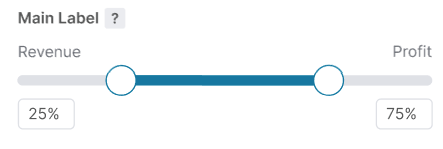
- Parameters:
paramName- Name of the input parameter. Use a stable camelCase identifier; this is the stored input name, not the display label.- Returns:
- RangeSlider user entry builder.
- Since:
- 17.0 - Paloma
- See Also:
-
createHiddenEntry
Creates new hidden input (context parameter). This type of input is not visible to the user.Example:
form.createHiddenEntry("hidden") .setValue("MyHiddenValue") .buildFormInput()- Parameters:
paramName- Name of the input parameter. Use a stable camelCase identifier; this is the stored input name, not the display label.- Returns:
- Hidden entry builder.
- Since:
- 17.0 - Paloma
- See Also:
-
createButtonEntry
Creates a new button input.Example:
The button is rendered as follows:form.createButtonEntry("button") .setLabel("Button") .setTargetPage(AppPages.MD_PRODUCTS_PAGE) .buildFormInput()
- Parameters:
paramName- Name of the input parameter. Use a stable camelCase identifier; this is the stored input name, not the display label.- Returns:
- Button entry builder.
- Since:
- 17.0 - Paloma
- See Also:
-
createStringUserEntry
Creates newStringUserEntryuser input (context parameter).Example:
The input field is rendered as follows:form.createStringUserEntry("String") .setLabel("String") .setValue("Replace me") .buildFormInput()
- Parameters:
paramName- Name of the input parameter. Use a stable camelCase identifier; this is the stored input name, not the display label.- Returns:
- String user entry builder.
- Since:
- 17.0 - Paloma
- See Also:
-
createTextUserEntry
Creates newTextUserEntryuser input (context parameter). Rendered as a multi-line text box that enables the user to enter a longer text value.Example:
The input field is rendered as follows:form.createTextUserEntry("Comments") .setLabel("Comment") .buildFormInput()
- Parameters:
paramName- Name of the input parameter. Use a stable camelCase identifier; this is the stored input name, not the display label.- Returns:
- Text user entry builder.
- Since:
- 17.0 - Paloma
- See Also:
-
createAnyUserEntry
Creates newUserEntryinput (context parameter). It is rendered as a user picker dialog / select list.Example:
The input field is rendered as follows:form.createAnyUserEntry("AnyUser") .setLabel("AnyUser") .buildFormInput()
- Parameters:
paramName- Name of the input parameter. Use a stable camelCase identifier; this is the stored input name, not the display label.- Returns:
- User entry input builder.
- Since:
- 17.0 - Paloma
- See Also:
-
createVLookup
Creates newLookUpinput (context parameter). Searches for a record in the Company Parameter namedparamNamewhere the column 'name' matches the value selected by the user (in a drop-down) and returns the value from the column 'value'.The input renders as a drop-down whose selectable entries are loaded from the named Company Parameter.
Example:
The input field is rendered as follows:form.createVLookup("VolumeDiscount") .setLabel("Select a discount") .buildFormInput()
- Parameters:
paramName- Name of the Company Parameter to look up.- Returns:
- User entry input builder.
- Since:
- 17.0 - Paloma
- See Also:
-
createProductEntry
ProductInputBuilder createProductEntry()Creates newProductEntryinput (context parameter). This is an empty product entry object that must be filled with input parameters by calling createParameter on the object.- Returns:
- Product entry builder.
- Since:
- 17.0 - Paloma
- See Also:
-
createProductEntry
Creates newProductEntryuser input (context parameter). This is commonly used in PromotionManager and RebateManager. It is rendered as a product group picker widget.Example:
The input field is rendered as follows:form.createProductEntry("Product") .setLabel("Select a product") .buildFormInput()
- Parameters:
paramName- Name of the input parameter. Use a stable camelCase identifier; this is the stored input name, not the display label.- Returns:
- Product input builder.
- Since:
- 17.0 - Paloma
- See Also:
-
createProductGroupEntry
PCGroupInputBuilder createProductGroupEntry()Creates newProductGroupEntryinput (context parameter). This is an empty product group entry object. Must be filled with input parameters by calling createParameter on the object.- Returns:
- Product group entry builder.
- Since:
- 17.0 - Paloma
- See Also:
-
createProductGroupEntry
Creates newProductGroupEntryuser input (context parameter). Creates an input parameter that enables the user to select a group of products. This is commonly used in PromotionManager and RebateManager. It is rendered as a product group picker widget.The input parameter returns the user selection as a Map:
Convert the value in the consuming logic with[ "productFieldName" : "attribute3", "productFieldLabel" : "Business Unit", "productFieldValue" : "MeatBall" ]ProductGroup.fromMap(input.ProductGroup).Example:
The input field is rendered as follows (as an example, multiple products selected):form.createProductGroupEntry("ProductGroup") .setLabel("Select products") .buildFormInput()
- Parameters:
paramName- Name of the input parameter. Use a stable camelCase identifier; this is the stored input name, not the display label.- Returns:
- Product group entry builder.
- Since:
- 17.0 - Paloma
- See Also:
-
createCustomerEntry
CustomerInputBuilder createCustomerEntry()Creates newCustomerEntryinput (context parameter). This is an empty customer entry object. Must be filled with input parameters by calling createParameter on the object.- Returns:
- Customer entry builder.
- Since:
- 17.0 - Paloma
- See Also:
-
createCustomerEntry
Creates newCustomerEntryinput (context parameter). This is commonly used in Agreement & Promotions and Rebates. It is rendered as a customer picker widget.Example:
The customer picker is rendered as follows:form.createCustomerEntry("Customer") .setLabel("Select a customer") .buildFormInput()
- Parameters:
paramName- Name of the input parameter. Use a stable camelCase identifier; this is the stored input name, not the display label.- Returns:
- Customer input builder.
- Since:
- 17.0 - Paloma
- See Also:
-
createCustomerGroupEntry
PCGroupInputBuilder createCustomerGroupEntry()Creates newCustomerGroupEntryinput (context parameter). This is an empty customer group entry object. Must be filled with input parameters by calling createParameter on the object.- Returns:
- Customer group entry builder.
- Since:
- 17.0 - Paloma
- See Also:
-
createCustomerGroupEntry
Creates newCustomerGroupEntryinput (context parameter). This input parameter enables the user to select multiple customers and return the selection as a Map. This is commonly used in Agreement & Promotions and Rebates. It is rendered as a customer group picker widget.The input parameter returns the user selection as a Map:
Convert the value in the consuming logic with[ "customerFieldName" : "attribute3", "customerFieldLabel" : "Customer Type", "customerFieldValue" : "Restaurant" ]CustomerGroup.fromMap(input.CustomerGroup).Example:
The customer picker is rendered as follows:form.createCustomerGroupEntry("CustomerGroup") .setLabel("Customer(s)") .buildFormInput()
- Parameters:
paramName- Name of the input parameter. Use a stable camelCase identifier; this is the stored input name, not the display label.- Returns:
- Customer group input builder.
- Since:
- 17.0 - Paloma
- See Also:
-
createSellerEntry
SellerInputBuilder createSellerEntry()Creates newSellerEntryinput (context parameter). This is an empty seller entry object. Must be filled with input parameters by calling createParameter on the object.- Returns:
- Seller entry builder.
- Since:
- 17.0 - Paloma
- See Also:
-
createSellerEntry
Creates newSellerEntryuser input (context parameter). It is rendered as a seller picker widget.Example:
The input field is rendered as follows:form.createSellerEntry("Seller") .setLabel("Select a seller") .buildFormInput()
- Parameters:
paramName- Name of the input parameter. Use a stable camelCase identifier; this is the stored input name, not the display label.- Returns:
- Seller entry builder.
- Since:
- 17.0 - Paloma
- See Also:
-
createSellerGroupEntry
PCGroupInputBuilder createSellerGroupEntry()Creates newSellerGroupEntryinput (context parameter). This is an empty seller group entry object. Must be filled with input parameters by calling createParameter on the object.- Returns:
- Seller group entry builder.
- Since:
- 17.0 - Paloma
- See Also:
-
createSellerGroupEntry
Creates newSellerGroupEntryinput (context parameter). This input parameter enables the user to select a group of sellers and returns the selection as a Map. It is rendered as a seller group picker widget.The input parameter returns the user selection as a Map:
Convert the value in the consuming logic with[ "sellerFieldName" : "attribute3", "sellerFieldLabel" : "Seller Type", "sellerFieldValue" : "Restaurant" ]SellerGroup.fromMap(input.SellerGroup).Example:
The input field is rendered as follows:form.createSellerGroupEntry("SellerGroup") .setLabel("Seller(s)") .buildFormInput()
- Parameters:
paramName- Name of the input parameter. Use a stable camelCase identifier; this is the stored input name, not the display label.- Returns:
- Seller group input builder.
- Since:
- 17.0 - Paloma
- See Also:
-
createOptionEntry
Creates newOptionEntryuser input (context parameter). The input returns a value selected by the user from a list displayed in the drop-down.The options and their labels are typically provided dynamically through the form's
valueOptionsphase (FormValueOptionsApi). For a small, fixed set of options (fewer than about ten) you can set them inline withsetOptionsandsetLabels; in that case the options are persisted on the object the form is attached to (for example, a quote).Example:
The input field is rendered as follows (with the drop-down menu expanded):form.createOptionEntry("Option") .setLabel("Option") .buildFormInput()
- Parameters:
paramName- Name of the input parameter. Use a stable camelCase identifier; this is the stored input name, not the display label.- Returns:
- Option input builder.
- Since:
- 17.0 - Paloma
- See Also:
-
createOptionsEntry
Creates newOptionsEntryinput (context parameter). The input parameter enables the user to select multiple values from predefined options. It is rendered as a drop-down list of possible options. Each selected value appears at the top.The options and their labels are typically provided dynamically through the form's
valueOptionsphase (FormValueOptionsApi). For a small, fixed set of options (fewer than about ten) you can set them inline withsetOptionsandsetLabels; in that case the options are persisted on the object the form is attached to (for example, a quote).Example:
The input field is rendered as follows (with multiple options selected):form.createOptionsEntry("Options") .setLabel("Options") .buildFormInput()
- Parameters:
paramName- Name of the input parameter. Use a stable camelCase identifier; this is the stored input name, not the display label.- Returns:
- Option input builder.
- Since:
- 17.0 - Paloma
- See Also:
-
createTreeEntry
Creates newTreeEntryinput (context parameter). The input parameter enables the user to use hierarchical filtering over passed data. It is rendered as a drop-down hierarchical list of possible values. Each selected value appears at the top.Example:
// data set where 'title' and 'value' keys are mandatory and 'children' is optional // (can be null, empty collection or title/value/children structure) // values for 'value' key needs to be unique across all data set // if data contains not unique values, the api.hierarchicalFilteringDataAdjustment(List, boolean) can be used. def exData = [[title : 'Cars', value : '[Cars]', children: [[title: 'Bugatti', value: '[Cars, Bugatti]']]], [title : 'Bikes', value : '[Bikes]', children: [[title: 'Bugatti', value: '[Bikes, Bugatti]']]]] form.createTreeEntry('hierarchicalFilter') .setLabel('Hierarchical Filter Inside Acc input') .setCheckedStrategy(CheckedStrategy.CHILD) .setMultiple(true) .setTree(exData) .buildFormInput()- Parameters:
paramName- Name of the input parameter. Use a stable camelCase identifier; this is the stored input name, not the display label.- Returns:
- Tree Input Builder
- Since:
- 17.0 - Paloma
- See Also:
-
createInputMatrix
Creates newInputMatrixuser input (context parameter). This input parameter enables the user to select a matrix of values. It renders as a grid-style input widget with the specified columns. The result will be a list (= rows) of maps (= row's columns). The map attribute names are the column names.Make sure the column names are valid JSON identifiers (spaces are ok but try to avoid special chars).
Example:
The input matrix is rendered as follows:def columns = ["Col 1", "Col 2"] def columnsValueOption = [ "Col 1": ["Yellow", "Blue"] ] form.createInputMatrix("InputMatrix") .setColumns(columns) .setColumnValueOptions(columnsValueOption) .setLabel("InputMatrix") .buildFormInput()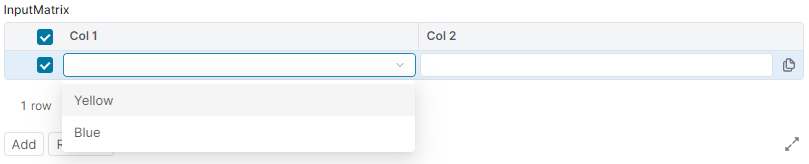
- Parameters:
paramName- Name of the input parameter. Use a stable camelCase identifier; this is the stored input name, not the display label.- Returns:
- Input matrix input builder.
- Since:
- 17.0 - Paloma
- See Also:
-
createFilterBuilder
Creates newFilterBuilderUserEntryinput (context parameter). This input parameter enables the user to build a filter for a table of objects of the type defined by thetypeCodeparameter.It is rendered as a filter builder widget allowing to construct a filter (for example, to define a filter for Products, set the
typeCodetoP).Example:
The filter input is rendered as follows:form.createFilterBuilder("FilterBuilder", "P") .setLabel("Set a product filter") .buildFormInput()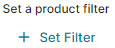
- Parameters:
paramName- Name of the input parameter. Use a stable camelCase identifier; this is the stored input name, not the display label.typeCode- Type code string of the type of the object for which the filter is set. Currently, the supported type codes are "P" (Product data) and "C" (Customer data).- Returns:
- Filter input builder.
- Since:
- 17.0 - Paloma
- See Also:
-
createDmFilterBuilder
Creates a newInputType.DMFILTERBUILDERinput type.NOTE:
If filters passed to
DmFilterBuilder.setFilters(Object...)are not correct, anIllegalFilterExceptionis thrown.
If source name passed to the object's constructor is not correct, aNullOrEmptyArgumentExceptionis thrown.Example:
// The filters can be provided as Filter, ex: import com.googlecode.genericdao.search.Filter def dimFilters = Filter.equal('CustomerId', 'CD-00155') // as List, ex: def dimFilters = ['CustomerId', 'ProductId'] // as Map, ex: def dimFilters = [CustomerId : 'CD-00155', ProductId : 'MB-0005'] // or advanced filter as Map, ex: def dimFilters = [_constructor: 'AdvancedCriteria', criteria : [[fieldName: 'CustomerId', value: 'CD-00155', operator: 'equals'], [fieldName: 'ProductId', value: ['MB-0005', 'MB-0006'], operator: 'inSet']], operator : 'and'] form.createDmFilterBuilder('dataFilter', 'DM.SalesTransactions') .setFilters(dimFilters) .buildFormInput()- Parameters:
paramName- Name of the input parameter. Use a stable camelCase identifier; this is the stored input name, not the display label.source- Name of the source for which the filter is set. The resolution of the source is as follows:- any
Datamart- by typedId, sourceName, uniqueName or label - any
FieldCollection- by typedId or sourceName, such asDMTablesourceName: 'DMT.tableUniqueName'
- any
- Returns:
- Datamart filter builder.
- Since:
- 17.0 - Paloma
- See Also:
-
createDmFilterBuilderMultiple
Creates a newdatamartFilterBuilderUserEntriesinput (context parameter). This input parameter allows the user to build a filter for a given Datamart using multiple filter values.Example:
Please note: The method returns a map, therefore the
api.filterFromMapmethod must be used to convert the map object into the filter object (see the example below).
Also, check the input value fornullas theapi.filterFromMapmethod does not accept the null value as an argument.form.createDmFilterBuilderMultiple("DataFilter", "DM.SalesTransactions") .setLabel("Data Filter") .setFilters(dimFilters) .buildFormInput() // Read the selected value, for example in the calculation logic: input.DataFilter ? api.filterFromMap(input.DataFilter) : null- Parameters:
paramName- Name of the input parameter. Use a stable camelCase identifier; this is the stored input name, not the display label.source- Name of the source for which the filter is set. The resolution of the source is as follows:- any Datamart - by typedId, sourceName, uniqueName or label
- any FieldCollection - by typedId or sourceName
- Returns:
- Datamart filter builder.
- Since:
- 17.0 - Paloma
- See Also:
-
createDmFilter
Creates new DM dim filter input.Example:
The input field is rendered as follows:form.createDmFilter("productFilter", "DM.SalesTransactions", "ProductID") .buildFormInput()
- Parameters:
paramName- Name of the input parameter. Use a stable camelCase identifier; this is the stored input name, not the display label.fcTypedId- Name of the source for which the filter is set. The resolution of the source is as follows:- any Datamart - by typedId, sourceName, uniqueName or label
- any FieldCollection - by typedId or sourceName
field- field name- Returns:
- DmFilter
- Since:
- 17.0 - Paloma
-
createDmQueryBuilder
Advanced input allowing to build one or more queries on PA and PO data sources (DMDS, DM, DMT, ...).Example:
The query builder is rendered as follows:form.createDmQueryBuilder("query") .setLabel("Build your query") .buildFormInput()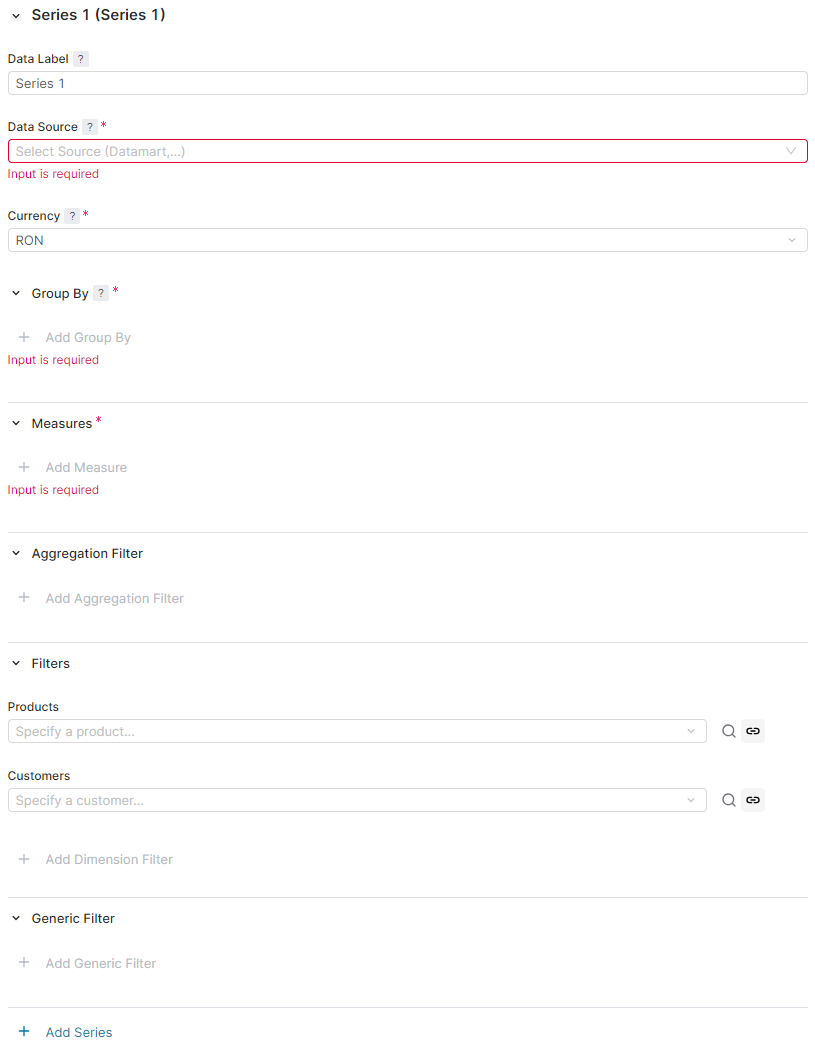
- Parameters:
paramName- Name of the input parameter. Use a stable camelCase identifier; this is the stored input name, not the display label.- Returns:
- DmQueryBuilderInputBuilder
- Since:
- 17.0 - Paloma
-
createDmQueryFilterBuilder
DmQueryFilterBuilderInputBuilder createDmQueryFilterBuilder(String paramName, Map<String, Object> dmQueryBuilderState) Advanced input to use jointly with DM Query Builder. It allows selecting one of the series configured in the Query Builder and defining a Filter to apply to its results.Its value is a singleton Map, with the selected series alias as a key and the Filter as a mapped value.
Example:
The filter input field is rendered as follows:form.createDmQueryBuilder("query") .setLabel("Build your query") .buildFormInput() def qbState = input.query as Map if (qbState) { form.createDmQueryFilterBuilder("filter", qbState) .setLabel("Build your filter") .buildFormInput() }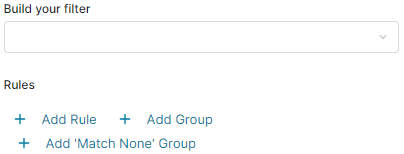
- Parameters:
paramName- Name of the input parameter. Use a stable camelCase identifier; this is the stored input name, not the display label.dmQueryBuilderState- Value returned by aDM Query Builder input- Returns:
- DmQueryFilterBuilderInputBuilder
- Since:
- 17.0 - Paloma
-
createMultiTierEntryInputBuilder
Creates a newMultiTierInputBuilder.Example:
The multi-tier inputs are rendered as follows:import net.pricefx.common.api.chart.TieredValueValidationType import net.pricefx.common.api.chart.TieredValueSortType form.createMultiTierEntryInputBuilder("multiTier") .setLabel("Multi Tier") .setValue([ "10" : "20", "20" : "40" ]) .setSortType(TieredValueSortType.ASC) .setValidationType(TieredValueValidationType.NO_VALIDATION) .buildFormInput()
- Parameters:
paramName- Name of the input parameter. Use a stable camelCase identifier; this is the stored input name, not the display label.- Returns:
- MultiTierInputBuilder
- Since:
- 17.0 - Paloma
- See Also:
-
createDMField
Creates a newDMFieldinput field (a context parameter). This input parameter enables a user to select a field from the drop-down menu (only one option can be selected). The Datamart is specified by the source parameter.Example:
The input field is rendered as follows (as an example - with a value already selected):form.createDMField("MyInput", "DM.SalesTransactions") .setLabel("DM Field") .setFieldTypes(FieldType.NUMBER, FieldType.MONEY) // to select either number or money fields .setFieldKind(FieldKind.DIMENSION, FieldKind.KEY) // AND that are dimension or key .buildFormInput()
- Parameters:
paramName- Name of the input parameter. Use a stable camelCase identifier; this is the stored input name, not the display label.source- A name of the source Datamart to choose a field from- Returns:
- DMField input builder
- Since:
- 17.0 - Paloma
- See Also:
-
createDMFields
Creates a newDMFieldinput field (a context parameter). This input parameter enables a user to select a field from the drop-down menu (multiple options can be selected). The Datamart is specified by the source parameter.Example:
The input field is rendered as follows (as an example - with values selected):form.createDMFields("MyInput", "DM.SalesTransactions") .setFieldTypes(FieldType.NUMBER, FieldType.MONEY) // to select either number or money fields .setFieldKind(FieldKind.DIMENSION, FieldKind.KEY) // AND that are dimension or key .buildFormInput()
- Parameters:
paramName- Name of the input parameter. Use a stable camelCase identifier; this is the stored input name, not the display label.source- A name of the source Datamart to choose fields from- Returns:
- DMFields input builder
- Since:
- 17.0 - Paloma
- See Also:
-
createParsableInputTypeFile
Creates a newParsableInputFileinput (a context parameter).This input parameter enables a user to upload an XLSX file.
This method works only with entities that can have attachments (for example, Quotes, Agreements/Promotions, Rebate Agreements). Since the uploaded file is stored and linked in the database, you must first save the entity (for example, a quote) to create an instance in the database.
Example:
The input field is rendered as follows:form.createParsableInputTypeFile("File") .buildFormInput()
- Parameters:
paramName- Name of the input parameter. Use a stable camelCase identifier; this is the stored input name, not the display label.- Returns:
- A handle that uniquely identifies the binary and its version assigned to the input.
- Since:
- 17.0 - Paloma
- See Also:
-
createRebateAgreement
Creates a newRebateAgreementuser input (a context parameter). This input parameter enables a user to choose/pick a rebate agreement from the drop-down menu.Example:
The input field is rendered as follows:form.createRebateAgreement("RebateAgreement") .setLabel("Select a Rebate Agreement") .buildFormInput()
- Parameters:
paramName- Name of the input parameter. Use a stable camelCase identifier; this is the stored input name, not the display label.- Returns:
- RebateAgreement input builder
- Since:
- 17.0 - Paloma
- See Also:
-
createQuoteType
Creates a newQuoteTypeinput (a context parameter). This input parameter enables a user to choose/pick a quote type from the drop-down menu and picker.Example:
The input fields are rendered as follows (within theform.createQuoteType("New quote") .buildFormInput()ResultMatrix):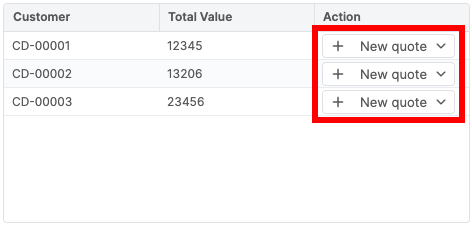
Note: This input is currently only supported as a context linking button in a
ResultMatrixcell.- Parameters:
paramName- Name of the input parameter. Use a stable camelCase identifier; this is the stored input name, not the display label.- Returns:
- QuoteType input builder
- Since:
- 17.0 - Paloma
- See Also:
-
createDMSource
Creates a newDMSourceinput (a context parameter). This input parameter enables a user to choose an existing FieldCollection from the drop-down menu.Example:
The input field is rendered as follows:form.createDMSource("DMSource") .setLabel("Select the Field Collection Source") .setTypes("DMDS", "DM") .buildFormInput()
- Parameters:
paramName- Name of the input parameter. Use a stable camelCase identifier; this is the stored input name, not the display label.- Returns:
- DMSource input builder
- Since:
- 17.0 - Paloma
- See Also:
-
createDashboardPopup
Creates a new input which allows the user to select a Dashboard and define some associated preferences, including its input filters and displayed portlets. The front end will display the selected Dashboard in a fully editable popup window.It's possible to define a
Filterin order to show only a subset of the available Dashboards.Example to show only Dashboards starting with "<prefix>":
The input is rendered as follows (before a dashboard is selected):form.createDashboardPopup("Dashboard") .setFilter(Filter.ilike("uniqueName", "<prefix>%")) .buildFormInput()
- Parameters:
paramName- Name of the input parameter. Use a stable camelCase identifier; this is the stored input name, not the display label.- Returns:
- a Dashboard Popup input builder
- Since:
- 17.0 - Paloma
- See Also:
-
createDashboardInputs
DashboardInputsInputBuilder createDashboardInputs(String paramName, String dashboardName, String... portletPath) Creates a new Dashboard Inputs input which displays all inputs of a given dashboard. All inputs will be displayed inline, similar to how an inline configurator is rendered.The value of the Dashboard Inputs input is a Map of all the dashboard's inputs. Key is an individual input's name, mapped to its value.
The input is rendered as follows (embedded fields from the given Dashboard):def optionalPath = ["embeddedPortlet", "embeddedPortletInsideEmbeddedPortlet"] form.createDashboardInputs("DB Inputs", "Dashboard_UniqueName", *optionalPath) .setMaximumDepth(1) // optional - maximum recursion levels for embedded Dashboards .buildFormInput()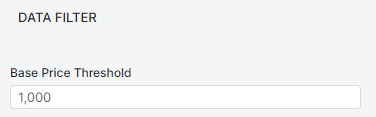
- Parameters:
paramName- Name of the input parameter. Use a stable camelCase identifier; this is the stored input name, not the display label.dashboardName- Name of a dashboard.portletPath- Optional path to the portlet.- Returns:
- a Dashboard Inputs input builder
- Since:
- 17.0 - Paloma
- See Also:
-
createDmQueryBuilderDimOption
DmQueryBuilderDimOptionBuilder createDmQueryBuilderDimOption(String paramName, String seriesAlias, String dimensionAlias, Map<String, Object> queryBuilderState) Creates a user input that loads only the list of dimension values from the Data Scope series, without querying all the data.Example, creating this input within the form logic:
The input field is rendered as follows:form.createDmQueryBuilderDimOption("InvoiceLineID", 'j', 's1_InvoiceLineID', input.queryBuilderState) .setLabel("InvoiceLineID") .buildFormInput()
- Parameters:
paramName- Name of the input parameter. Use a stable camelCase identifier; this is the stored input name, not the display label.seriesAlias- The alias of series.dimensionAlias- The alias of the dimension you want to retrieve values for. These values are displayed as options in the user input's drop-down menu.queryBuilderState- The queryBuilderState object (a map) that contains the series and dimensions you want to filter option values in this user input by.- Returns:
- A new instance of DmQueryBuilderDimOptionBuilder
- Since:
- 17.0 - Paloma
- See Also:
-
createResultMatrixFilterBuilder
ResultMatrixFilterBuilder createResultMatrixFilterBuilder(String paramName, ResultMatrix resultMatrix) Creates a new user input that generates an advanced filter using the specified Result Matrix.Note: Specify column formats of the Result Matrix to provide the column type information for the filter.
Example, creating the Result Matrix Filter using the specified Result Matrix within the form logic:
The input field is rendered as follows:def products = api.find("P", 0, 10, null, ["sku", "label", "currency"]) def resultMatrix = api.newMatrix().withColumnFormats([ "sku" : FieldFormatType.TEXT, "label" : FieldFormatType.TEXT, "currency": FieldFormatType.TEXT ]).withRows(products) form.createResultMatrixFilterBuilder("matrixFilter", resultMatrix) .setLabel("Result Matrix Filter") .buildFormInput()
- Parameters:
paramName- Name of the input parameter. Use a stable camelCase identifier; this is the stored input name, not the display label.resultMatrix- The ResultMatrix to filter on.- Returns:
- A new instance of ResultMatrixFilterBuilder.
- Since:
- 17.0 - Paloma
- See Also:
-
createCustomFormListPopup
Creates a new user input, the "Open" button that opens the pop-up modal. Allows a user to select a Custom Form (CFO) from the list of CFOs (opened as a pop-up modal) with the specified Custom Form Type (CFOT).Example:
form.createCustomFormListPopup("customFormPopup", "123.CFOT") .setLabel("Select a Custom Form") .withSubsetFilter(Filter.equal("formStatus", "APPROVED")) .withRecalculateParentOnPopupConfirm(true) .buildFormInput()- Parameters:
paramName- A name of the CustomFormListPopup input.typedId- The typedId of the Custom Form Type you want to display Custom Forms in the pop-up modal for.- Returns:
- CustomFormListPopupInputBuilder
- Since:
- 17.0 - Paloma
- See Also:
-
createCustomFormPopup
Creates a new user input, the "Open" button that opens the standalone CFO. Allows a user to open a Custom Form (CFO).Example:
def typedId = api.find("CFO", Filter.equal("uniqueName", "CFO-123"))[0].typedId form.createCustomFormPopup("customFormPopup", typedId) .setLabel("Open a Custom Form") .withRecalculateParentOnPopupConfirm(true) .buildFormInput()- Parameters:
paramName- A name of the CustomFormPopup input.typedId- The typedId of the Custom Form you want to open.- Returns:
- CustomFormPopupInputBuilder
- Since:
- 17.0 - Paloma
- See Also:
-
createConfigurationWizardPopup
ConfigurationWizardPopupInputBuilder createConfigurationWizardPopup(String paramName, String typedId) Creates a new user input, the "Open" button that opens the Configuration Wizard (CW). Allows a user to open a Configuration Wizard.Example:
def typedId = api.find("CW", Filter.equal("uniqueName", "CW-123"))[0].typedId form.createConfigurationWizardPopup("configurationWizardPopup", typedId) .setLabel("Open Configuration Wizard") .withRecalculateParentOnPopupConfirm(true) .buildFormInput()- Parameters:
paramName- A name of the ConfigurationWizardPopup input.typedId- The typedId of the Configuration Wizard you want to open.- Returns:
- ConfigurationWizardPopupInputBuilder
- Since:
- 17.0 - Paloma
- See Also:
-